

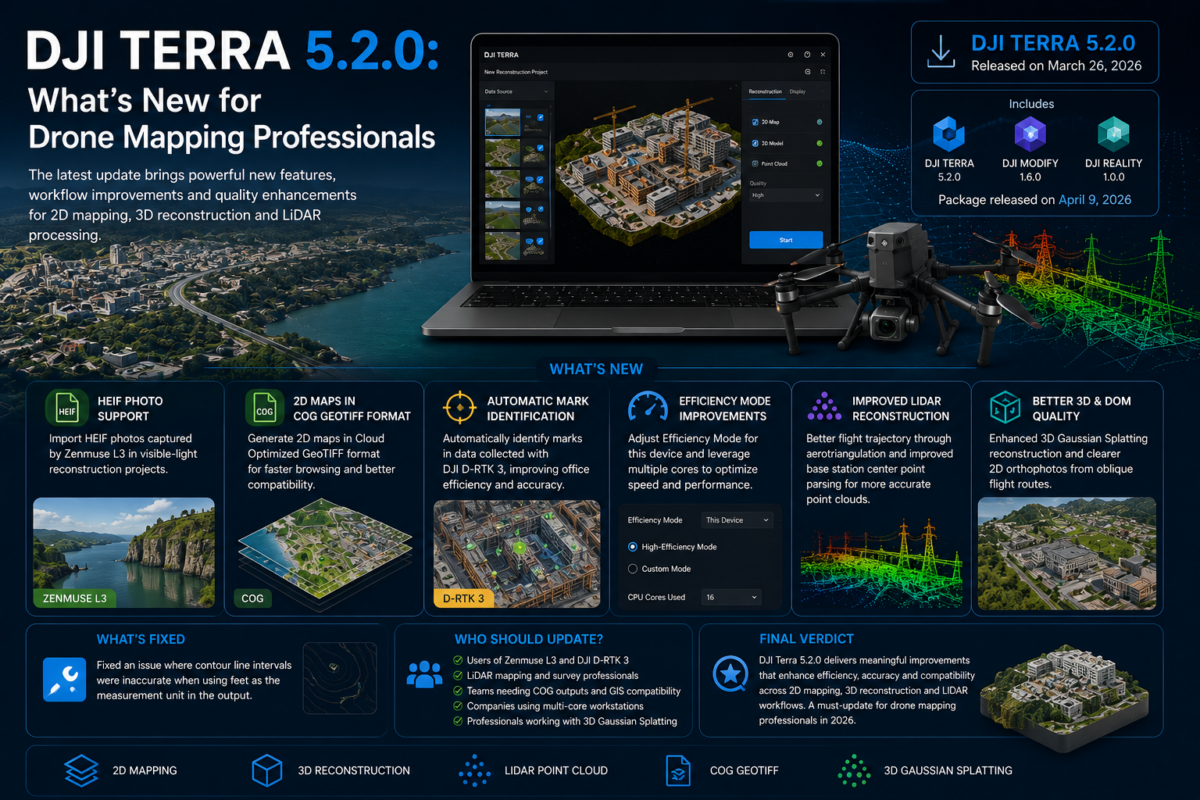
DJI Terra 5.2.0 is an important update for drone mapping professionals, surveyors, LiDAR users, inspection teams and companies working inside the DJI Enterprise ecosystem. Released in March 2026, this version introduces several practical improvements that can directly affect daily production workflows, especially for users working with Zenmuse L3 data, LiDAR point clouds, 2D map outputs, ground control workflows and high-performance workstations.
While some software updates focus only on minor fixes, DJI Terra 5.2.0 brings changes that are particularly relevant for professional users. The update adds support for importing HEIF photos captured by Zenmuse L3 in visible-light reconstruction projects, introduces 2D map generation in GeoTIFF COG format, supports automatic mark identification for data collected with DJI D-RTK 3, adds new efficiency settings for local processing, and improves LiDAR point cloud reconstruction results.
For drone service providers and enterprise teams, these changes matter because they can reduce manual work, improve compatibility with downstream GIS software, accelerate reconstruction workflows and make DJI Terra more efficient in real production environments. In this article, we explain what is new in DJI Terra 5.2.0 and why it matters for professional drone mapping.
What Is DJI Terra 5.2.0?
DJI Terra 5.2.0 is the latest generation of DJI’s professional mapping and reconstruction software, designed for 2D mapping, 3D reconstruction, LiDAR point cloud processing and digital model creation. It is part of DJI’s broader enterprise software ecosystem and is commonly used with DJI drones, DJI Enterprise payloads and professional survey workflows.
The official DJI download page lists DJI Terra V5.2.0 as a Windows version released on March 26, 2026. DJI also lists a later package including DJI Terra V5.2.0, DJI Modify V1.6.0 and DJI Reality V1.0.0, released on April 9, 2026. This confirms that DJI Terra is increasingly positioned not only as a mapping tool, but also as part of a larger reconstruction, editing and reality modeling workflow.
Why DJI Terra 5.2.0 Matters for Drone Mapping
For drone mapping professionals, software updates should be evaluated by one simple question: do they improve real-world production? In the case of DJI Terra 5.2.0, the answer is yes, especially for users who work with DJI Enterprise sensors and need faster, cleaner and more compatible outputs.
The most important improvements are not only about adding new file formats. They are about making the workflow more practical. Support for COG GeoTIFF outputs can improve how 2D maps are used in downstream software. Automatic mark identification with DJI D-RTK 3 can reduce manual processing time. Efficiency Mode can help users better exploit multi-core computers. LiDAR optimizations can improve the quality and reliability of point cloud reconstruction projects.
In short, DJI Terra 5.2.0 is not just a compatibility update. It is a production-oriented update for teams that need to process drone data more efficiently.
Main New Features in DJI Terra 5.2.0
1. HEIF Photo Support for Zenmuse L3 Visible-Light Reconstruction
One of the most important additions in DJI Terra 5.2.0 is support for importing HEIF photos captured by the Zenmuse L3 in visible-light reconstruction projects.
This is relevant because modern sensors and payloads are increasingly generating optimized image formats. HEIF can be more efficient than older image formats, but software compatibility is essential. Without proper support in the reconstruction software, professional teams may be forced to convert files before processing, creating an additional step in the workflow.
With DJI Terra 5.2.0, users working with Zenmuse L3 visible-light data can import supported HEIF photos directly into reconstruction projects. This can simplify project preparation and make the workflow more natural for teams using DJI’s latest enterprise payload ecosystem.
It is important to note that the official release notes specify that HEIF photo import in DJI Terra 5.2.0 is currently supported only for data captured by the Zenmuse L3. Therefore, users should not assume that all HEIF files from every camera or device will be supported in the same way.
2. 2D Map Generation in GeoTIFF COG Format
Another major improvement is support for generating 2D maps in GeoTIFF COG format. COG stands for Cloud Optimized GeoTIFF, a format designed to improve the way large geospatial raster files are accessed, displayed and used in modern GIS and web mapping environments.
For drone mapping professionals, this can be a very useful improvement. Orthomosaics and 2D maps can become very large, especially when processing high-resolution drone imagery over large areas. Traditional GeoTIFF files may be heavy to browse or slow to load in downstream software. COG format is designed to make map browsing faster and more efficient.
This matters for several industries:
- Surveying companies sharing orthomosaics with GIS teams
- Construction teams reviewing site maps over time
- Mining companies handling large aerial datasets
- Public agencies managing geospatial layers
- Enterprise users publishing large raster outputs internally
By adding COG output support, DJI Terra 5.2.0 becomes more practical for professional geospatial workflows where outputs are not only viewed in DJI Terra, but also used in other platforms.
3. Automatic Mark Identification for DJI D-RTK 3 Data
DJI Terra 5.2.0 adds support for automatic mark identification for data collected with DJI D-RTK 3. According to DJI’s release notes, this improvement is designed to improve office processing efficiency and reduce manual marking time.
This is a very practical update for surveyors and mapping professionals. Ground control points, checkpoints and marking workflows are essential for accuracy, but they can also be time-consuming. Any feature that reduces manual point identification can save office time, especially on large projects with many marks or repeated survey missions.
The benefit is not only speed. Reducing manual work can also help standardize the workflow across teams. When multiple technicians process projects, automation can reduce inconsistencies and make the production pipeline more repeatable.
4. New Efficiency Mode Settings for This Device
DJI Terra 5.2.0 introduces the ability to adjust Efficiency Mode for “This Device” in the settings. Users can enable High-Efficiency Mode or Custom Mode to use multiple computing cores and optimize reconstruction efficiency and speed.
This is especially important for professionals working on high-performance desktop computers or workstations. Drone mapping and 3D reconstruction are computationally demanding tasks. Large projects can involve thousands of images, dense point clouds, LiDAR datasets and heavy reconstruction operations.
With improved control over efficiency settings, users can better adapt DJI Terra to their hardware. For example, a company using a powerful multi-core workstation may want to allocate more computing resources to reconstruction tasks, while another user may prefer a more balanced configuration to keep the computer usable during processing.
DJI also notes that when running multiple computing cores on the same device, users should set the project directory to a folder with a shorter path because of Windows’ 260-character file path limitation. This is an important operational detail for avoiding read/write or reconstruction failures caused by excessively long paths.
What Has Been Updated in DJI Terra 5.2.0?
1. Improved LiDAR Point Cloud Reconstruction Results
DJI Terra 5.2.0 optimizes LiDAR point cloud reconstruction results by improving the flight trajectory through aerotriangulation. This is highly relevant for users working with LiDAR mapping, corridor mapping, forestry, infrastructure inspection and complex terrain modeling.
LiDAR processing quality depends on several factors, including sensor calibration, trajectory accuracy, positioning data and reconstruction algorithms. Any improvement to trajectory optimization can potentially lead to cleaner and more reliable point cloud outputs.
For professional users, better LiDAR results can reduce the need for manual correction and increase confidence in final deliverables.
2. Improved Parsing Rules for Base Station Center Points
The update also optimizes the parsing rules for base station center points in LiDAR point cloud reconstruction tasks. DJI states that this is intended to enhance the accuracy of base station center points.
This improvement is important because base station information can be central to accurate georeferencing. If the base station center point is parsed incorrectly or inefficiently, the processing workflow can become less reliable. Improved parsing can help make LiDAR reconstruction projects more stable and accurate.
3. Better 2D Digital Orthophoto Maps from Oblique Flight Routes
DJI Terra 5.2.0 optimizes the quality of 2D reconstructed digital orthophoto maps, also known as DOMs, from oblique flight route data. DJI describes the result as clearer and more natural imagery.
This is useful for users who do not only fly traditional nadir missions. Oblique data can be valuable for urban environments, building facades, infrastructure, construction sites and 3D context. However, generating clean 2D outputs from oblique imagery can be challenging. Improvements in this area can help produce better visual results from more complex flight patterns.
4. Improved 3D Gaussian Splatting Reconstruction
DJI Terra 5.2.0 includes optimizations for 3DGS in visible-light reconstruction tasks, enhancing reconstruction results in the Extra High quality setting and improving reconstruction efficiency in the High quality setting.
3D Gaussian Splatting is becoming increasingly important for photorealistic 3D visualization. Unlike traditional mesh-based outputs, Gaussian Splatting can produce highly realistic scene representations that are useful for digital twins, visual inspection, urban documentation, cultural heritage, real estate, infrastructure and immersive visualization.
For professional users, the important point is that DJI is continuing to improve 3DGS performance and quality inside DJI Terra. This suggests that Terra is evolving beyond conventional mapping into more advanced reality capture and visualization workflows.
5. Better 2D Map Reconstruction Efficiency with Zenmuse L3 LiDAR Data
DJI also optimized the efficiency of 2D map reconstruction in LiDAR point cloud tasks using data collected by the Zenmuse L3. This is another sign that DJI Terra 5.2.0 is strongly oriented toward newer DJI payload workflows.
For teams that process Zenmuse L3 datasets, this can help reduce turnaround time and improve productivity, especially when processing frequent or large-scale mapping missions.
6. Default Noise Reduction and Accuracy Improvement for Visible-Light Point Clouds
In DJI Terra 5.2.0, noise reduction and accuracy improvement are now enabled by default in visible-light point cloud projects. This is a useful change for users who want better default results without manually adjusting every processing parameter.
For less experienced users, better defaults can help avoid poor outputs. For professional teams, it can help standardize quality across projects and operators.
What Has Been Fixed in DJI Terra 5.2.0?
DJI Terra 5.2.0 also fixes an issue where contour line intervals were inaccurate when feet were used as the measurement unit in the output.
This is a specific but important fix for users in markets where feet are commonly used, such as the United States. Contour lines are often used in surveying, engineering, terrain analysis and construction. If intervals are inaccurate, the output can create confusion or require additional checking. Fixing this issue improves reliability for users working with imperial units.
DJI Terra 5.2.0 Summary Table
| Area | What Changed | Why It Matters |
|---|---|---|
| Zenmuse L3 | HEIF photo import support for visible-light reconstruction | Simplifies workflows with supported Zenmuse L3 data |
| 2D Mapping | COG GeoTIFF output support | Improves browsing speed in downstream GIS software |
| D-RTK 3 | Automatic mark identification | Reduces manual marking time and improves office efficiency |
| Processing Speed | Efficiency Mode and multi-core optimization | Helps use workstation resources more effectively |
| LiDAR | Trajectory optimization and base station parsing improvements | Can improve point cloud reconstruction quality and reliability |
| 3DGS | Improved 3D Gaussian Splatting quality and efficiency | Supports more advanced 3D visualization workflows |
| Orthophotos | Better DOM quality from oblique flight routes | Creates clearer and more natural 2D imagery |
| Fixes | Corrected contour interval issue when using feet | Improves reliability for imperial-unit workflows |
Who Should Update to DJI Terra 5.2.0?
DJI Terra 5.2.0 is especially relevant for users working with recent DJI Enterprise payloads and professional mapping workflows. You should strongly consider updating if you use Zenmuse L3, DJI D-RTK 3, LiDAR point cloud reconstruction, COG-compatible GIS workflows, 3D Gaussian Splatting or high-performance local workstations.
The update is also useful for companies that need to improve office efficiency. Automatic mark identification, better default processing settings and improved reconstruction efficiency can all reduce time spent on manual operations.
You should consider DJI Terra 5.2.0 if:
- You work with Zenmuse L3 data
- You need COG GeoTIFF outputs for GIS workflows
- You use DJI D-RTK 3 in survey operations
- You process LiDAR point cloud reconstruction projects
- You create 2D maps from oblique flight route data
- You want better 3D Gaussian Splatting results
- You use a multi-core workstation for local reconstruction
Practical Advice Before Updating
Before updating to DJI Terra 5.2.0, professional users should back up important projects and check compatibility with their current workflow. This is especially important for companies with standardized production pipelines, cluster workflows or ongoing projects.
Users should also pay attention to file path management. DJI notes that due to the Windows 260-character path limitation, it is recommended to set the project directory to a folder with a shorter path when running multiple computing cores on the same device. This can help avoid file read/write problems or reconstruction failures.
For companies using DJI Terra in production, it may be useful to test the new version on a sample project before migrating all active projects. This is a standard best practice for professional software updates.
Final Verdict: Is DJI Terra 5.2.0 a Major Update?
DJI Terra 5.2.0 is not just a minor maintenance release. For drone mapping professionals, it is a meaningful update that improves several important parts of the workflow: file compatibility, 2D map delivery, D-RTK 3 mark identification, multi-core processing, LiDAR reconstruction and 3D Gaussian Splatting results.
The update is particularly important for users working inside the latest DJI Enterprise ecosystem, especially those using Zenmuse L3 and DJI D-RTK 3. It also strengthens DJI Terra as a practical tool for professional mapping teams that need faster processing, better outputs and smoother integration with downstream software.
In short, DJI Terra 5.2.0 is worth attention if you are serious about drone mapping, LiDAR processing, 3D reconstruction or high-efficiency production workflows in 2026.
Need help choosing or upgrading your DJI Terra license? Contact our team for professional guidance. We can help you compare DJI Terra Standard, Flagship, Agriculture, Cluster and DJI Modify options based on your drone model, sensor, project type and required outputs.
FAQ: DJI Terra 5.2.0
What is new in DJI Terra 5.2.0?
DJI Terra 5.2.0 adds HEIF photo import support for Zenmuse L3 visible-light reconstruction, COG GeoTIFF 2D map output, automatic mark identification for DJI D-RTK 3 data, new Efficiency Mode settings, LiDAR reconstruction improvements and 3D Gaussian Splatting optimizations.
When was DJI Terra 5.2.0 released?
DJI’s official download page lists DJI Terra V5.2.0 as released on March 26, 2026. A package including DJI Terra V5.2.0, DJI Modify V1.6.0 and DJI Reality V1.0.0 is listed with a Windows version date of April 9, 2026.
Does DJI Terra 5.2.0 support HEIF photos?
Yes, but according to DJI’s release notes, HEIF photo import in DJI Terra 5.2.0 is currently supported for data captured by the Zenmuse L3 in visible-light reconstruction projects.
What is COG GeoTIFF support in DJI Terra?
COG stands for Cloud Optimized GeoTIFF. In DJI Terra 5.2.0, users can generate 2D maps in GeoTIFF COG format, which can improve browsing speed and usability in downstream geospatial software.
Why is automatic mark identification important?
Automatic mark identification for DJI D-RTK 3 data can reduce manual marking time and improve office processing efficiency, especially for surveyors working with control points and checkpoints.
Does DJI Terra 5.2.0 improve LiDAR processing?
Yes. DJI Terra 5.2.0 optimizes LiDAR point cloud reconstruction results by improving flight trajectory through aerotriangulation and improving base station center point parsing rules.
Does DJI Terra 5.2.0 improve 3D Gaussian Splatting?
Yes. DJI Terra 5.2.0 optimizes 3DGS in visible-light reconstruction tasks, improving reconstruction results in Extra High quality mode and increasing reconstruction efficiency in High quality mode.
Should professional users update to DJI Terra 5.2.0?
Professional users should consider updating, especially if they work with Zenmuse L3, DJI D-RTK 3, LiDAR point clouds, COG GeoTIFF outputs, 3D Gaussian Splatting or high-performance workstation processing. As always, production teams should test the update before migrating active projects.


