

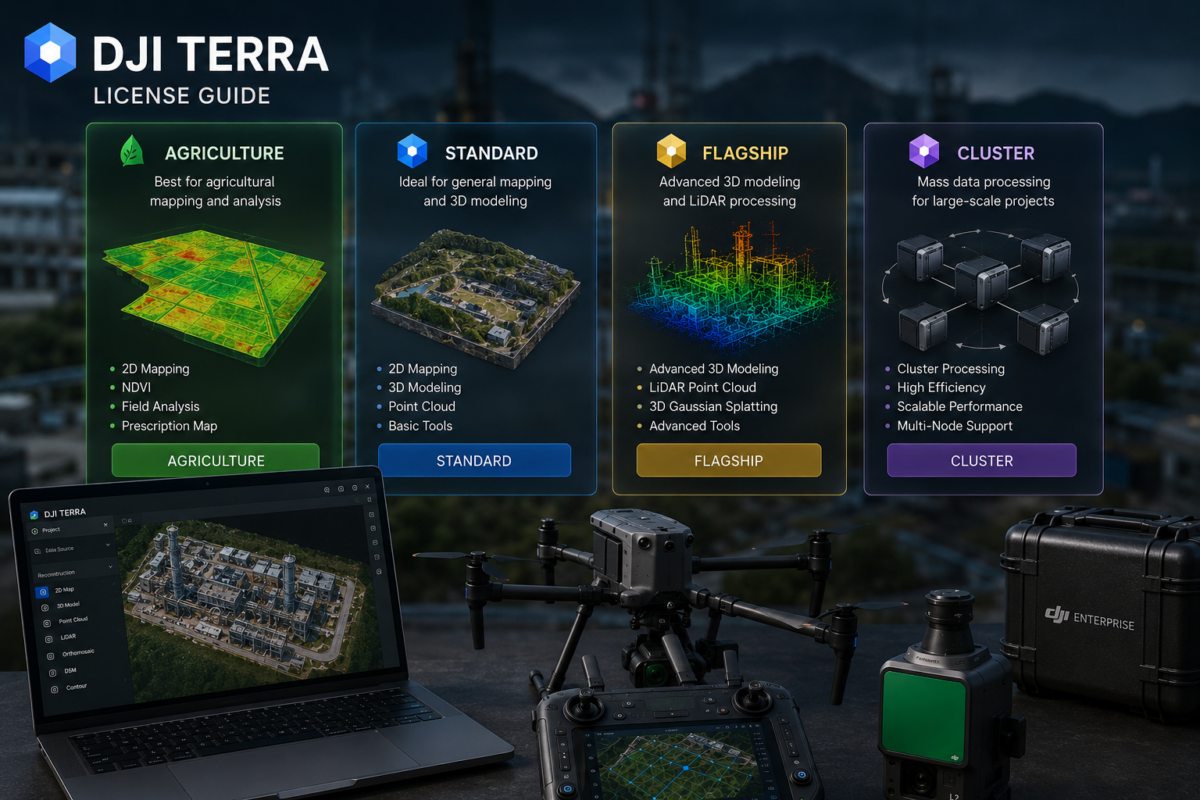
Choosing the right DJI Terra license can be confusing, especially for new users who are trying to understand the differences between Standard, Flagship, Agriculture and Cluster versions. DJI Terra is a professional software platform for drone mapping, 2D reconstruction, 3D reconstruction, LiDAR point cloud processing and advanced 3D modeling workflows. However, not every license is designed for the same type of user.
Some professionals only need regular 2D maps and standard 3D reconstruction. Others need advanced 3D modeling, LiDAR workflows, 3D Gaussian Splatting, DJI Modify integration or large-scale processing. Agriculture users may need crop-related mapping features, while enterprise teams may require Cluster processing to handle large workloads more efficiently.
This guide explains the main DJI Terra license versions in a practical way: Standard, Flagship, Agriculture and Cluster. We will also discuss online and offline licenses, DJI Modify packages, who should choose each version and what professionals should check before buying.
What Is DJI Terra?
DJI Terra is DJI’s professional software for drone mapping and 3D reconstruction. DJI describes Terra as 3D modeling software equipped with next-generation reconstruction technologies, including 3D Gaussian Splatting. It supports 2D and 3D reconstruction from visible-light imagery and can process data collected by DJI LiDAR systems.
For DJI Enterprise drone users, DJI Terra can become the central processing platform for aerial data. It can help transform drone images and LiDAR datasets into practical outputs such as orthomosaics, 3D models, point clouds, digital surface models, terrain outputs and realistic visual reconstructions.
DJI Terra is especially relevant for industries such as surveying, construction, infrastructure inspection, agriculture, energy, mining, forestry, real estate and public safety.
Why DJI Terra Licensing Matters
The correct DJI Terra license depends on your workflow. Buying the wrong version can create two problems. First, you may pay for features you do not need. Second, and more importantly, you may discover that the license you purchased does not include the advanced features required for your project.
For example, a user who only needs regular mapping may not need the most advanced package. However, a company working with LiDAR, 3D Gaussian Splatting or advanced reconstruction should carefully evaluate whether Standard is enough or whether Flagship is required.
Licensing also matters because DJI Terra is available through different channels. DJI Store currently offers online licenses, while DJI states that Standard, Flagship and Cluster versions are available through official DJI dealers. DJI Store also notes that users interested in other licenses, such as offline or Education licenses, should make a purchase inquiry. This means professional buyers should always confirm the exact license type before ordering.
DJI Terra License Versions Overview
| License Version | Best For | Main Purpose | Typical User |
|---|---|---|---|
| DJI Terra Agriculture | Agricultural mapping | Crop and farmland-related workflows | Agronomists, farms, agricultural drone operators |
| DJI Terra Standard | General mapping and standard reconstruction | 2D maps, standard 3D models and common DJI drone workflows | Drone service providers, construction teams, beginner mapping users |
| DJI Terra Flagship | Advanced professional workflows | Advanced 3D, LiDAR, inspection and high-end reconstruction workflows | Surveyors, inspection teams, enterprise users, advanced 3D professionals |
| DJI Terra Cluster | Large-scale processing | Distributed or high-volume processing workflows | Enterprise teams, mapping departments, high-volume production users |
DJI Terra Agriculture: Who Is It For?
DJI Terra Agriculture is designed for users working in agricultural mapping and crop-related workflows. This version is most relevant for farmers, agronomists, agricultural service providers and drone operators who use drones to monitor farmland, crop conditions and agricultural areas.
Agricultural drone mapping often has different requirements from surveying or construction. The goal is not always a detailed 3D model or LiDAR point cloud. Instead, agricultural users may need maps that help them understand field conditions, plant health, crop variability, irrigation issues or management zones.
DJI Store lists DJI Terra Agriculture as one of the available online license versions and shows it as a one-year plan for three devices. Availability, pricing and included features may vary by region, so users should always check current purchase information before buying.
Best Use Cases for DJI Terra Agriculture
- Farmland mapping
- Crop monitoring
- Agricultural drone workflows
- Field documentation
- Basic agricultural analysis and reporting
- Farm management support
Who Should Choose Agriculture?
Choose DJI Terra Agriculture if your main work is agricultural mapping and you do not need the full professional surveying, LiDAR or advanced 3D reconstruction capabilities of higher-tier versions.
DJI Terra Standard: The Practical Entry-Level Professional Option
DJI Terra Standard is generally the best starting point for users who need professional drone mapping without requiring every advanced feature. It is suitable for many common workflows such as 2D map generation, standard 3D reconstruction and general site documentation.
For drone service providers, construction companies, real estate teams and basic surveying users, Standard can be a cost-effective way to enter the DJI Terra ecosystem. It is particularly useful if your projects are based on DJI drones and you mainly need practical outputs such as orthomosaics, site maps and standard 3D models.
DJI Store lists Standard as one of the available online versions, while DJI’s official Terra page states that Standard is also available through official DJI dealers. Depending on the market, users may find online, offline, annual or other commercial options through authorized channels.
Best Use Cases for DJI Terra Standard
- 2D mapping
- Orthomosaic creation
- Basic 3D reconstruction
- Construction site documentation
- Real estate site modeling
- General DJI Enterprise drone mapping
- Small and medium professional mapping projects
Who Should Choose Standard?
Choose DJI Terra Standard if you mainly need everyday drone mapping and standard 3D reconstruction. It is a good choice if you are starting with DJI Terra, if your projects are not extremely complex, or if you want to control software costs while still working with professional mapping tools.
DJI Terra Flagship: The Advanced Professional Version
DJI Terra Flagship is designed for more demanding professional workflows. It is the version to evaluate if you need advanced reconstruction, LiDAR processing, high-end 3D modeling, inspection-related workflows or the most complete DJI Terra feature set.
Flagship is especially relevant for surveying companies, infrastructure inspection teams, industrial users, utility companies, construction groups, digital twin teams and professionals working with advanced DJI payloads.
DJI Terra’s official positioning includes next-generation reconstruction technologies such as 3D Gaussian Splatting. Reseller and DJI-related product information commonly associate higher-tier packages with advanced reconstruction and professional feature sets. Because licensing can vary by region and package, users should confirm whether the exact function they need is included in the specific Flagship license they intend to purchase.
Best Use Cases for DJI Terra Flagship
- Advanced 3D reconstruction
- LiDAR point cloud workflows
- 3D Gaussian Splatting visualization
- Infrastructure inspection
- Industrial facility documentation
- Digital twin workflows
- High-value surveying projects
- Professional DJI Enterprise mapping operations
Who Should Choose Flagship?
Choose DJI Terra Flagship if DJI Terra will be a central part of your professional production workflow and you need access to advanced features. If you work with LiDAR, complex 3D modeling, inspection, digital twins or enterprise-level deliverables, Flagship is usually the safer long-term choice.
DJI Terra Cluster: For Large-Scale Processing
DJI Terra Cluster is designed for users who need large-scale processing capacity. It is relevant for companies that regularly process large datasets, high volumes of drone imagery, complex 3D reconstruction projects or enterprise mapping workloads.
Cluster processing is not usually necessary for small mapping jobs. It becomes important when processing time, production volume and scalability become business-critical. For example, a company processing many large construction sites, corridor surveys, city-scale datasets or frequent LiDAR projects may need more than a single workstation workflow.
DJI’s official Terra page states that Cluster versions are available for order through official DJI dealers. This means users interested in DJI Terra Cluster should normally contact a dealer or DJI sales channel rather than relying only on standard online store options.
Best Use Cases for DJI Terra Cluster
- Large-scale drone mapping projects
- High-volume production workflows
- Enterprise mapping departments
- Multiple project processing pipelines
- Large 3D reconstruction datasets
- City-scale or corridor-scale mapping
- Organizations needing faster turnaround times
Who Should Choose Cluster?
Choose DJI Terra Cluster if processing speed and scalability are critical. It is most suitable for enterprise users, mapping departments and professional teams that process large datasets frequently and cannot rely only on one computer for production.
DJI Terra and DJI Modify Packages
DJI Store also lists package options such as Flagship + Modify Flagship and Standard + Modify Flagship. These packages combine DJI Terra with DJI Modify, DJI’s intelligent 3D model editing software.
DJI Modify is useful when reconstructed 3D models require cleanup, repair, smoothing, optimization or point cloud/model refinement. This can be important for users delivering client-ready 3D models, realistic visualizations or digital twin outputs.
A DJI Terra license may be enough for users who only need mapping and reconstruction. However, users who need to edit, repair or refine 3D models should evaluate DJI Modify packages carefully.
When DJI Modify Makes Sense
- You deliver 3D models to clients
- You need to repair mesh defects
- You want cleaner visual outputs
- You work with digital twin-style deliverables
- You need better 3D model presentation quality
- You want a more complete DJI reconstruction and editing workflow
Online vs Offline DJI Terra Licenses
One of the most important licensing questions is whether you need an online or offline license.
DJI Store states that only online licenses are available through the store and that users should ensure network connectivity when using the software. It also notes that each license can be bound to only one DJI account and one computer, and that the account bound to a license cannot be changed.
For users who need offline licenses, Education licenses or other license types, DJI Store recommends making a purchase inquiry. This is especially important for government agencies, security-sensitive companies, remote field teams and organizations that cannot depend on regular internet connectivity.
Online License: Best For
- Users with regular internet access
- Standard office-based processing
- Small businesses and individual professionals
- Users buying directly through DJI Store
Offline License: Best For
- Remote operations with limited internet
- Government and security-sensitive workflows
- Companies with strict data policies
- Field teams operating in isolated environments
- Organizations that require local processing without online dependency
Annual vs Permanent Licenses
DJI Terra availability can vary depending on region, dealer and license type. Online store options are commonly presented as subscription plans, such as one-year licenses. In some markets, authorized dealers may offer additional options, including offline or permanent licenses.
Before purchasing, users should confirm:
- Whether the license is annual or permanent
- Whether it is online or offline
- How many computers or devices are supported
- Whether account binding can be changed
- Whether the license includes DJI Modify
- Whether advanced features are included
- Whether technical support is included
This is essential because the license name alone may not tell the full story. Always check the exact SKU, region and feature list.
Which DJI Terra License Should You Choose?
| Your Workflow | Recommended License | Why |
|---|---|---|
| Crop and field mapping | Agriculture | Designed for agricultural drone workflows |
| Basic 2D maps and standard 3D models | Standard | Good balance of cost and professional functionality |
| Construction site documentation | Standard or Flagship | Standard may be enough for regular mapping; Flagship for advanced 3D/LiDAR |
| LiDAR point cloud processing | Flagship | Better suited to advanced professional workflows |
| 3D Gaussian Splatting and advanced visualization | Flagship or higher-tier package | Advanced reconstruction features usually require higher-tier licensing |
| 3D model editing and repair | Terra + Modify package | DJI Modify adds model editing and cleanup capabilities |
| Large-scale processing | Cluster | Designed for enterprise-scale processing workloads |
| No internet or restricted environment | Offline license inquiry | Online store licenses require network connectivity |
Common Mistakes When Buying DJI Terra
Many users choose a DJI Terra license based only on price. This can lead to problems if the selected license does not include the required features.
Common mistakes include:
- Buying Agriculture when the workflow requires surveying or 3D reconstruction
- Choosing Standard when advanced 3D or LiDAR workflows are required
- Not checking whether the license is online or offline
- Assuming DJI Modify is included automatically
- Not confirming the number of supported devices
- Not checking account binding rules
- Buying a subscription when a permanent or offline option is required
- Not confirming compatibility with the drone or payload
The best approach is to define the workflow first, then choose the license. Do not start from the license name. Start from the outputs you need.
Questions to Ask Before Buying DJI Terra
Before purchasing DJI Terra, ask these questions:
- Which drone and payload will I use?
- Do I need 2D maps, 3D models, LiDAR point clouds or all of them?
- Do I need 3D Gaussian Splatting?
- Do I need DJI Modify for model editing?
- Will I process small projects or large datasets?
- Do I need online or offline activation?
- Will the software be used on one computer or multiple devices?
- Do I need annual, permanent, Education or enterprise licensing?
- What export formats and deliverables do my clients require?
Answering these questions will make the license decision much easier.
Final Verdict
DJI Terra licensing is easier to understand when each version is connected to a real workflow. Agriculture is for agricultural mapping. Standard is for common professional drone mapping and standard reconstruction. Flagship is for advanced 3D, LiDAR, inspection and enterprise-level reconstruction workflows. Cluster is for large-scale processing and high-volume production.
Online licenses may be suitable for many users, but offline, Education or enterprise requirements should be discussed through official DJI dealers or purchase inquiries. Users who need 3D model editing should also evaluate DJI Modify packages.
The most important advice is simple: choose the license based on your required outputs, not only on price. A lower-cost license is not a good deal if it does not support your workflow. A higher-tier license can be a better investment if DJI Terra is central to your professional mapping business.
Need help choosing the right DJI Terra license? Contact our team for professional guidance. We can help you compare DJI Terra Agriculture, Standard, Flagship, Cluster, DJI Modify and online/offline options based on your drone model, payload, project type and required deliverables.
FAQ: DJI Terra License Guide
What DJI Terra versions are available?
DJI Terra is commonly available in versions such as Agriculture, Standard, Flagship and Cluster. DJI Store also lists package options such as Standard + Modify Flagship and Flagship + Modify Flagship. Availability may vary by region and sales channel.
What is DJI Terra Agriculture used for?
DJI Terra Agriculture is designed for agricultural drone workflows, including farmland mapping, crop monitoring and field documentation.
What is DJI Terra Standard best for?
DJI Terra Standard is best for common professional mapping workflows such as 2D maps, orthomosaics, standard 3D models, construction site documentation and general DJI drone mapping.
What is DJI Terra Flagship best for?
DJI Terra Flagship is best for advanced professional workflows, including LiDAR, advanced 3D reconstruction, 3D Gaussian Splatting, infrastructure inspection, surveying and enterprise-level deliverables.
What is DJI Terra Cluster?
DJI Terra Cluster is designed for large-scale processing and high-volume production workflows. It is most relevant for enterprise users and mapping teams processing large datasets.
Does DJI Terra include DJI Modify?
Not always. DJI Store lists separate package options that combine DJI Terra with DJI Modify Flagship. Users should confirm whether DJI Modify is included in the license they are purchasing.
What is the difference between online and offline DJI Terra licenses?
Online licenses require network connectivity and are available through DJI Store. Offline licenses are intended for users who need to work without internet access or in restricted environments and usually require a purchase inquiry through official channels.
Can one DJI Terra license be used on multiple computers?
DJI Store states that each online license can be bound to only one DJI account and one computer, and that the account bound to a license cannot be changed. Users should verify the exact device rules for their license before buying.
Which DJI Terra license should I choose for LiDAR?
For LiDAR workflows, users should evaluate DJI Terra Flagship or other advanced packages and confirm that the selected license supports the required LiDAR processing features.
Which DJI Terra license should I choose for 3D Gaussian Splatting?
3D Gaussian Splatting is an advanced reconstruction feature, so users should verify whether it is included in the selected Flagship or higher-tier package before purchasing.
Is DJI Terra Standard enough for construction?
DJI Terra Standard may be enough for regular construction mapping, orthomosaics and standard 3D documentation. For advanced LiDAR, 3DGS or enterprise workflows, Flagship or other packages may be more appropriate.
How do I know which DJI Terra license is right for me?
Start by defining your required outputs: agriculture maps, orthomosaics, 3D models, LiDAR point clouds, advanced 3D visualization, model editing or large-scale processing. Then choose the license that supports those outputs.