

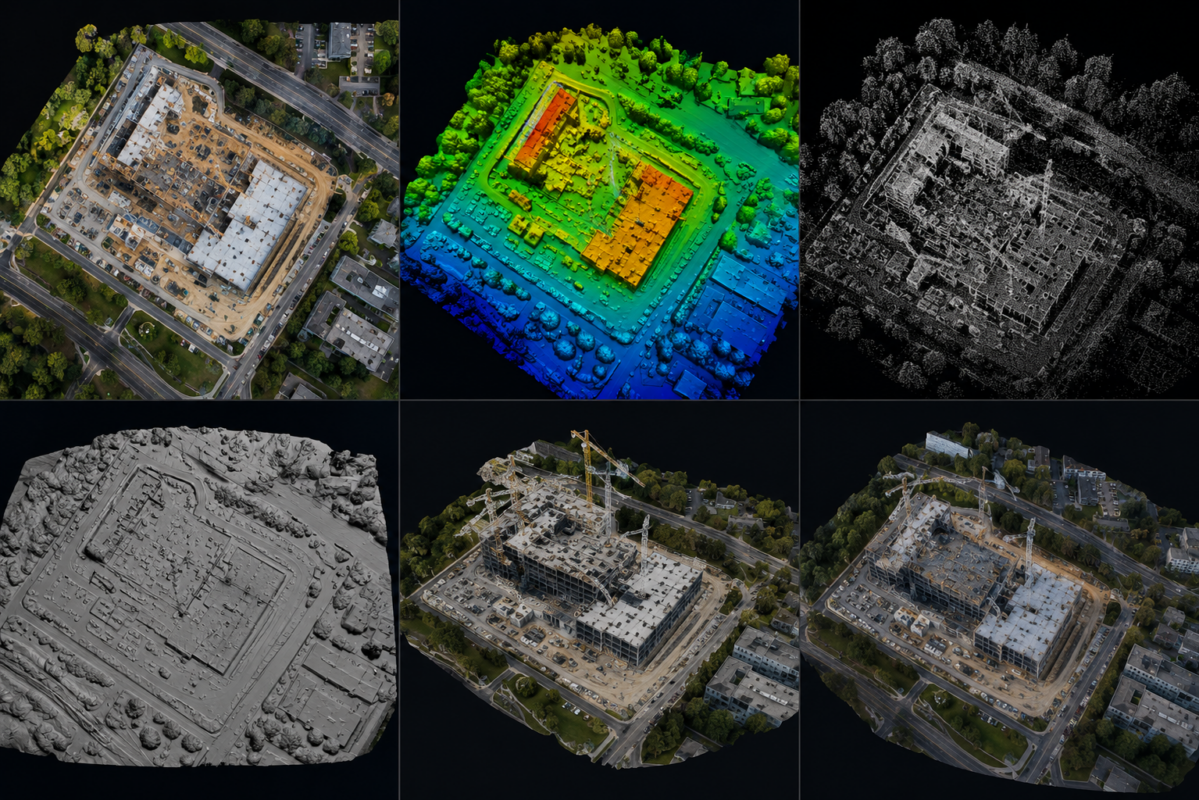
DJI Terra can generate several different outputs from drone imagery and LiDAR data, but many new users are not always sure what each output actually means. Terms like orthomosaic, DSM, DEM, point cloud, mesh and 3D model are often used together, but they are not the same thing. Each output has a different purpose, format, level of detail and professional use case.
Understanding these outputs is essential for drone mapping professionals, surveyors, construction companies, inspection teams, real estate developers, agricultural operators and infrastructure managers. Choosing the wrong output can create confusion, while choosing the right one can make your drone data much more useful.
DJI Terra is designed to transform aerial data into practical deliverables for mapping, modeling, LiDAR processing and visualization. According to DJI, Terra supports accurate and efficient 2D and 3D reconstruction from visible-light imagery, processes data collected by DJI LiDAR, and includes next-generation reconstruction technologies such as 3D Gaussian Splatting. For professional users, this means DJI Terra can generate both technical outputs and visual 3D deliverables.
In this guide, we explain the most important DJI Terra outputs: orthomosaic, DSM, DEM, point cloud, mesh and 3D model. You will learn what each output is, when to use it, which industries benefit from it and how these deliverables fit into professional drone mapping workflows.
Why DJI Terra Outputs Matter
A drone flight is only the first step in a mapping project. The real value comes from the processed outputs. A folder full of drone images is useful only after those images are converted into maps, models, surfaces or point clouds that can be measured, analyzed, shared or integrated into other software.
Different professionals need different outputs. A construction manager may need an updated orthomosaic to monitor site progress. A surveyor may need a DSM or point cloud for terrain analysis. A real estate developer may need a realistic 3D model for presentation. An infrastructure team may need a LiDAR point cloud for inspection and asset documentation.
This is why understanding DJI Terra outputs is so important. The same drone dataset can produce different deliverables depending on how it is captured and processed.
Quick Summary of DJI Terra Outputs
| Output | What It Is | Best For | Typical Use |
|---|---|---|---|
| Orthomosaic | A georeferenced 2D map created from drone images | Mapping, site documentation, GIS | Construction, land surveys, agriculture, planning |
| DSM | Digital Surface Model showing terrain and above-ground objects | Surface analysis and elevation context | Urban mapping, site planning, construction |
| DEM | Digital Elevation Model representing ground terrain | Terrain analysis | Topography, hydrology, engineering, forestry |
| Point Cloud | Millions of 3D points representing surfaces and objects | Surveying, LiDAR, inspection, 3D analysis | Corridors, quarries, buildings, infrastructure |
| Mesh | A surface model made of connected polygons | 3D modeling and visualization | Buildings, real estate, cultural heritage, construction |
| 3D Model | A complete visual 3D representation of a site or object | Presentation, inspection, digital twins | Real estate, infrastructure, client reporting |
1. Orthomosaic: The Most Common 2D Mapping Output
An orthomosaic is a high-resolution 2D map created by combining many overlapping drone images. Unlike a normal aerial photo, an orthomosaic is geometrically corrected so that it can be used as a map. Distortion caused by camera perspective, terrain variation and image angle is reduced during processing.
In DJI Terra, orthomosaics are usually generated from nadir drone images, meaning images captured with the camera pointing straight down. The software aligns the images, corrects them and blends them into one continuous map.
What Is an Orthomosaic Used For?
Orthomosaics are useful whenever a clear and updated top-down view of an area is needed. They are commonly used in construction, land surveying, agriculture, mining, infrastructure, environmental monitoring and emergency response.
Common orthomosaic use cases include:
- Construction site progress monitoring
- Land development planning
- Agricultural field mapping
- Road and infrastructure documentation
- Quarry and mining site updates
- Public safety and emergency mapping
- GIS basemap creation
Why Orthomosaics Matter
An orthomosaic is often the easiest DJI Terra output for non-technical users to understand. It looks like a high-resolution aerial image, but it can also support mapping and measurement workflows when properly georeferenced.
For construction companies, an orthomosaic can show the current condition of a job site. For agriculture, it can show crop patterns. For public works, it can document roads, land parcels and infrastructure. For real estate, it can provide clear site context.
2. DSM: Digital Surface Model
A DSM, or Digital Surface Model, represents the elevation of the visible surface captured by the drone. This includes not only the ground, but also buildings, trees, vehicles, equipment and other above-ground objects.
In simple terms, a DSM shows the top surface of everything the drone sees.
For example, if a drone maps a city block, the DSM will include the elevation of rooftops, trees and other objects. It does not automatically remove them to show only the bare ground.
What Is a DSM Used For?
DSM outputs are useful when you need to understand surface height and above-ground features. They can help with site planning, urban analysis, construction monitoring and infrastructure documentation.
Common DSM use cases include:
- Construction site surface analysis
- Urban planning and building height context
- Solar exposure and shadow studies
- Infrastructure and facility documentation
- Surface change monitoring
- Volume and terrain-related analysis when appropriate
DSM vs DEM: What Is the Difference?
The difference between DSM and DEM is important. A DSM includes the ground and objects above the ground. A DEM usually represents the bare-earth terrain, with objects such as buildings and vegetation removed or filtered out.
If you want to analyze everything visible from above, use a DSM. If you need the shape of the ground itself, use a DEM.
3. DEM: Digital Elevation Model
A DEM, or Digital Elevation Model, represents the terrain surface. In professional mapping, the term DEM is often used to describe a ground-focused elevation model. Unlike a DSM, a DEM is intended to show the bare-earth surface rather than buildings, trees and other objects.
In DJI Terra LiDAR workflows, DEM generation can require ground point classification. DJI documentation notes that after ground point classification, LiDAR workflows can output DEM and contour results. This is especially important for terrain applications where vegetation or above-ground objects should be removed from the final surface. DJI manuals and documentation.
What Is a DEM Used For?
DEMs are useful for terrain analysis and engineering workflows. They help professionals understand slope, elevation, drainage, earthworks and natural terrain conditions.
Common DEM use cases include:
- Topographic mapping
- Hydrological analysis
- Earthworks planning
- Road and infrastructure design support
- Forestry terrain analysis
- Mining and quarry terrain documentation
- Contour generation
Why DEMs Matter for Surveying
For surveyors and engineers, a DEM can be more useful than a visual 3D model because it represents terrain in a measurable way. However, DEM accuracy depends on data quality, control points, LiDAR or photogrammetry settings, point classification and processing methods.
When used for professional decisions, DEMs should be validated with checkpoints or other quality control methods. Read our DJI Terra accuracy, GCP and RTK guide to plan independent validation and coordinate checks.
4. Point Cloud: The 3D Foundation of Drone Mapping
A point cloud is a collection of many individual points in 3D space. Each point has coordinates, and depending on the data source, may also include color, intensity or classification information.
Point clouds can be generated from photogrammetry or LiDAR. In photogrammetry, points are calculated from overlapping images. In LiDAR workflows, points are created from laser measurements. DJI Terra can process data collected by DJI LiDAR and generate point cloud outputs.
What Is a Point Cloud Used For?
Point clouds are useful when professionals need 3D spatial information. They are widely used in surveying, infrastructure inspection, construction, forestry, mining, corridor mapping and industrial documentation.
Common point cloud use cases include:
- Topographic surveying
- LiDAR corridor mapping
- Powerline and utility inspection
- Building and infrastructure documentation
- Quarry and mining analysis
- Forestry and vegetation mapping
- Digital twin workflows
- 3D measurement and analysis
DJI Terra Point Cloud Export Formats
DJI documentation lists several point cloud output formats, including PNTS, LAS, S3MB, PLY and PCD. DJI describes LAS as one of the most common point cloud formats, while PNTS is suitable for Cesium/web viewing and S3MB is used for SuperMap-related 3D display workflows. DJI FAQ: LiDAR point cloud output formats.
Typical point cloud formats include:
- LAS: Common point cloud format for surveying and GIS workflows.
- PNTS: Cesium-compatible format often used for web visualization.
- S3MB: SuperMap 3D display format.
- PLY: Common 3D data format that can represent point cloud or polygon data.
- PCD: Point Cloud Data format used in some point cloud processing workflows.
Using DJI Terra Point Clouds in Revit
If your point cloud will be used in Autodesk Revit, read our DJI Terra to Revit point cloud workflow guide before selecting the export. Use it to plan the handoff from reconstruction to the receiving application, including the checks needed before delivery.
Confirm the required file format, coordinate system and units with the person who will use the cloud. Test a representative export before delivering a large project. Available outputs depend on the reconstruction type and software release, so review the choices in your installed Terra version.
5. Mesh: The Surface Built from 3D Data
A mesh is a 3D surface made from connected polygons, usually triangles. While a point cloud is made of individual points, a mesh connects those points into surfaces. This makes the output look more like a solid 3D object or scene.
In drone mapping, a mesh is often textured with images, creating a realistic-looking 3D model of a building, construction site, landscape or infrastructure asset.
What Is a Mesh Used For?
Meshes are useful for visualization, presentation, inspection, 3D modeling and digital documentation. They are often easier for non-technical users to understand than raw point clouds.
Common mesh use cases include:
- Building reconstruction
- Construction site visualization
- Real estate presentation
- Cultural heritage documentation
- Infrastructure inspection context
- Digital twin visual layers
- 3D model sharing and presentation
Mesh vs Point Cloud
A point cloud is usually better for technical analysis and measurement workflows. A mesh is often better for visual presentation and surface representation. Many professional workflows use both: the point cloud for analysis and the mesh for communication.
6. 3D Model: The Complete Visual Reconstruction
A 3D model is a broader term that can include mesh models, textured models, LOD models and other visual reconstructions. In DJI Terra, 3D model outputs can be used for inspection, visualization, presentation, digital twins and downstream 3D applications.
DJI documentation lists several model output formats, including B3DM, OSGB, PLY, OBJ, S3MB, i3S and FBX. DJI describes B3DM as a Cesium-supported 3D mesh model format mainly used for web display, OSGB as a common oblique photography modeling format, OBJ as a standard 3D model format, and FBX as a format developed by Autodesk that can be used in engineering, film, television and games. DJI FAQ: 3D reconstruction output formats.
Common DJI Terra 3D Model Formats
- B3DM: Useful for Cesium-based 3D web display.
- OSGB: Common LOD model format for oblique photography models.
- OBJ: Widely supported 3D model format for many modeling applications.
- PLY: Common 3D format for model or point cloud data.
- S3MB: SuperMap 3D model display format.
- i3S: LOD model format used in some GIS workflows.
- FBX: Useful for engineering, media, games and visualization workflows.
What Are 3D Models Used For?
3D models are especially useful when visual communication is important. A 3D model can help clients, managers, inspectors or stakeholders understand a site without needing to interpret technical point cloud data.
Common 3D model use cases include:
- Real estate visualization
- Construction site presentation
- Digital twin workflows
- Infrastructure documentation
- Inspection planning
- Urban modeling
- Cultural heritage and tourism
Orthomosaic vs DSM vs Point Cloud vs Mesh: Which One Do You Need?
The best DJI Terra output depends on the project goal. There is no single output that is best for every workflow.
| If You Need… | Choose This Output | Why |
|---|---|---|
| A clear top-down site map | Orthomosaic | It provides a georeferenced 2D view of the area |
| Surface height including buildings and trees | DSM | It represents the visible surface, including objects |
| Bare-earth terrain | DEM | It focuses on ground elevation |
| Technical 3D spatial data | Point Cloud | It provides dense 3D points for measurement and analysis |
| A visual surface model | Mesh | It connects points into a textured 3D surface |
| A client-friendly 3D presentation | 3D Model | It helps communicate the site visually |
Best DJI Terra Outputs by Industry
Surveying
Surveyors often need orthomosaics, point clouds, DSMs, DEMs and contour-related outputs. Point clouds and terrain models are especially important when measurements, elevation or surface analysis are required.
Construction
Construction teams benefit from orthomosaics for progress monitoring, 3D models for visualization, point clouds for documentation and DSMs for site analysis.
Real Estate
Real estate professionals usually benefit most from orthomosaics, textured 3D models and visually attractive reconstructions that help present properties and development sites.
Infrastructure
Infrastructure workflows often need point clouds, 3D models, DSMs and orthomosaics. LiDAR point clouds can be especially useful for corridors, bridges, towers and industrial assets.
Agriculture
Agricultural users often rely on 2D maps, orthomosaics and surface-related outputs for field monitoring, crop analysis and planning.
Mining and Quarries
Mining and quarry projects often benefit from orthomosaics, point clouds, DSMs and DEMs for site documentation, terrain monitoring and volume-related workflows.
Common Mistakes When Choosing DJI Terra Outputs
Many beginners choose outputs based on how impressive they look, rather than what the project requires. This can lead to wasted processing time or deliverables that are not useful for the client.
Common mistakes include:
- Delivering a 3D model when the client needs a GIS-ready orthomosaic
- Using a DSM when a bare-earth DEM is required
- Expecting a visual 3D model to replace survey-grade measurements
- Exporting a format the client cannot open
- Creating a point cloud without checking coordinate system settings
- Not validating accuracy with checkpoints when measurements matter
- Using only nadir images for a complex 3D model
- Ignoring file size and hardware limitations for large outputs
Best Practices for Better DJI Terra Outputs
Output quality starts before processing. Good flight planning and data capture are essential.
- Use enough image overlap for the intended output
- Capture oblique images for 3D models and vertical structures
- Use RTK, PPK or ground control points when accuracy matters
- Keep lighting conditions consistent where possible
- Use LiDAR for vegetation, corridors and complex terrain when needed
- Choose the output format based on the client’s software
- Validate outputs before using them for measurements
- Test small datasets before processing large production projects
Final Verdict
DJI Terra can generate many different outputs, and each one serves a different professional purpose. Orthomosaics are best for 2D mapping and site overview. DSMs show the visible surface, including buildings and vegetation. DEMs are useful for terrain-focused workflows. Point clouds provide dense 3D spatial data. Meshes create connected 3D surfaces. 3D models help communicate sites visually and support digital twin, real estate and inspection workflows.
The key is to choose the output based on the project objective. A surveyor, construction manager, real estate developer and infrastructure inspector may all use DJI Terra, but they may need different deliverables from the same drone data.
For professional users, DJI Terra is valuable because it can support both technical and visual outputs inside a DJI-centered workflow. When used correctly, it helps transform aerial imagery and LiDAR data into practical digital assets for mapping, modeling, analysis and communication.
Need help choosing the right DJI Terra license for your required outputs? Start with our DJI Terra License Guide or contact our team for professional guidance. We can help you compare DJI Terra Standard, Flagship, Agriculture, Cluster and DJI Modify options based on your drone model, project type, output formats and professional workflow.
FAQ: DJI Terra Outputs Explained
What is an orthomosaic in DJI Terra?
An orthomosaic is a georeferenced 2D map created from many overlapping drone images. It is corrected for distortion and can be used for mapping, documentation and GIS workflows.
What is a DSM in DJI Terra?
A DSM, or Digital Surface Model, represents the elevation of the visible surface, including terrain, buildings, trees and other above-ground objects.
What is the difference between DSM and DEM?
A DSM includes the ground and above-ground objects. A DEM is intended to represent bare-earth terrain, with objects such as buildings and vegetation removed or filtered out.
What is a point cloud?
A point cloud is a collection of millions of 3D points representing surfaces, terrain and objects. It can be generated from photogrammetry or LiDAR data.
What point cloud formats can DJI Terra export?
DJI documentation lists point cloud formats including PNTS, LAS, S3MB, PLY and PCD. LAS is one of the most common formats for professional point cloud workflows.
What is a mesh model?
A mesh model is a 3D surface made of connected polygons. It is often textured with images to create a realistic visual representation of a site or object.
What 3D model formats can DJI Terra export?
DJI documentation lists 3D model formats including B3DM, OSGB, PLY, OBJ, S3MB, i3S and FBX.
Which DJI Terra output is best for construction?
Construction teams often use orthomosaics for progress tracking, 3D models for visualization, point clouds for documentation and DSMs for surface analysis.
Which DJI Terra output is best for surveying?
Surveyors often need orthomosaics, point clouds, DSMs, DEMs and terrain-related outputs. The best output depends on the required accuracy and deliverable.
Can a 3D model replace a point cloud?
Not always. A 3D model is better for visualization, while a point cloud is often better for technical analysis and measurement workflows. Many professional projects use both.


